|
||
|
Sunday, 5 June 2016
White Hat Hacker

Website HackingTricks
|
||
|
Kali linux Toolkit
Top 10 Security Tools
|
||
|
Sunday, 24 January 2016
Security tips to protect your website from hackers
 |
1 Always Update Website !
Most hacking these days is entirely automated, with bots constantly scanning every site they can looking for exploitation opportunities. It is not good enough to update once a month or even once a week.
2 – Use Strong Passwords For Your Websites
I often need to log in to their site/server using their admin user details. I am frequently disturbed by how insecure their root passwords are. It is a little scary that I have to say this, but admin/admin is not a secure username and password combination.
3 – One Site = One Container
Not only can this result in all your sites being hacked at the same time, it also makes the cleanup process much more time consuming and difficult. The infected sites can continue to reinfect one another in an endless loop.
4 – Sensible User Access
Once you have separate user accounts for every user, you can keep an eye on user behavior by reviewing logs and knowing the usual behavior (when and where they normally access the website) so you can spot anomalies and confirm with the person that their account hasn’t been compromised.
5 – Change the Default Settings IF You use CMS!
It is usually easiest to change these default details when installing your CMS, but they can be changed later.
7 – Backups
Making backups of your website is very important, but storing these backups on your web server is a major security risk. These backups invariably contain unpatched versions of your CMS and extensions which are publicly available, giving hackers easy access to your server.
8 – Server Configuration Files
You should really get to know your web server configuration files. Apache web servers use the .htaccessfile,
9 – Install SSL
I’m actually of two minds as to whether or not to include this point because there have been so many articles incorrectly stating that installing SSL will solve all your security issues. SSL does nothing to protect your site against any malicious attacks, or stop it from distributing malware. SSL encrypts communications between Point A and Point B – the website server and browser. This encryption is important for one specific reason: it prevents anyone from being able to intercept that traffic, known as a Man in the Middle (MITM) attack.
10 – File Permissions
|
Saturday, 16 January 2016
whatsapp forensics
 |
The maximum users of smartphone they use free mobile messaging app WhatsApp. But what frequent WhatsApp chatters might not know is that there is an app out there that is designed to specifically steal the private chat conversations of users and that it can be a serious security threat to mobile phones. Which could allow hackers to trick users into downloading malware on their PCs. More than 900 million people use WhatsApp on a regular basis.
How do I move my chat history over to my new Android phone?Transferring via local backupQuick steps
Detailed stepsTo transfer local backup from one Android phone to another, please follow these steps:
Transferring via Google Drive
|
Andriller - Android Forensic Tools:-Andriller - is software utility with a collection of forensic tools for smartphones. It performs read-only, forensically sound, non-destructive acquisition from Android devices. It has other features, such as powerful Lock screen cracking for Pattern, PIN code, or Password; custom decoders for Apps data from Android (and some Apple iOS) databases for decoding communications. Extraction and decoders produce reports in HTML and Excel (.xlsx) formats.
|
Tuesday, 12 January 2016
XOR DDoS
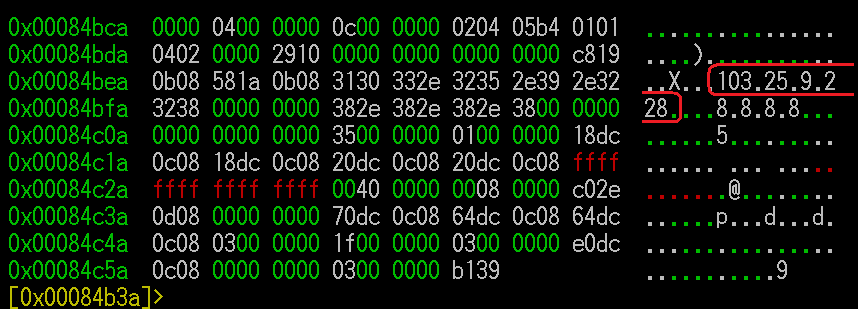 |
What is XOR DDoS?XOR DDoS is a Trojan malware that infects Linux systems, instructing them to launch DDoS attacks on demand by a remote attacker. Initially, attackers gain access by brute force attacks to discover the password to Secure Shell services on a Linux machine. Once login has been acquired, the attackers use root privileges to run a Bash shell script that downloads and executes the malicious binary. “Over the past year, the XOR DDoS botnet has grown and is now capable of being used to launch huge DDoS attacks,” said Stuart Scholly, senior vice president and general manager, Security Business Unit, Akamai. “XOR DDoS is an example of attackers switching focus and building botnets using compromised Linux systems to launch DDoS attacks. This happens much more frequently now than in the past, when Windows machines were the primary targets forDDoS malware.” XOR DDoS Denial of Service AttacksResearcher showed that the bandwidth of DDoS attacks coming from the XOR DDoS botnet ranged from low, single-digit Gbps to 150+ Gbps – an extremely large attack size. The most frequent target was the gaming sector, followed by educational institutions. The botnet attacks up to 20 targets per day, 90% of which were in Asia. Of the DDoS attacks from the XOR DDoS botnet Akamai has mitigated, several examples documented on August 22-23 are profiled in the threat advisory. One of the attacks was nearly 179 Gbps, and the other was almost 109 Gpbs. Two attack vectors were observed: SYN and DNS floods. The IP address of the bot is sometimes spoofed, but not always. The attacks observed in the DDoS campaigns against Akamai customers were a mix of spoofed and non-spoofed attack traffic. Spoofed IP addresses are generated such that they appear to come from the same /24 or /16 address space as the infected host. A spoofing technique where only the third or fourth octet of the IP address is altered is used to prevent Internet Service Providers (ISPs) from blocking the spoofed traffic on Unicast Reverse Path Forwarding (uRPF)-protected networks. DDoS mitigation of XOR DDoS attacksIdentifiable static characteristics were observed, including initial TTL value, TCP window size, and TCP header options. Payload signatures such as these can aid in DDoS mitigation. These are available in the threat advisory. In addition, tcpdump filters are provided to match SYN flood attack traffic generated by this botnet. How to detect and remove XOR DDoS malwareThe presence of XOR DDoS can be detected in two ways. To detect this botnet in a network, look for communications between a bot and its C2 using a Snort rule provided in the advisory. To detect infection of this malware on a Linux host, the advisory includes a YARA rule that pattern matches strings observed in the binary. XOR DDoS is persistent – it runs processes that will reinstall the malicious files if they are deleted. Therefore removing the XOR DDoS malware is a four-step process for which several scripts are provided in the advisory:
Akamai continues to monitor ongoing campaigns using XOR DDoS to launch DDoS attacks. To learn more about the threat, malware removal and DDoS mitigation techniques, please download a complimentary copy of the threat advisory at www.stateoftheinternet.com/xorddos. |
Monday, 11 January 2016
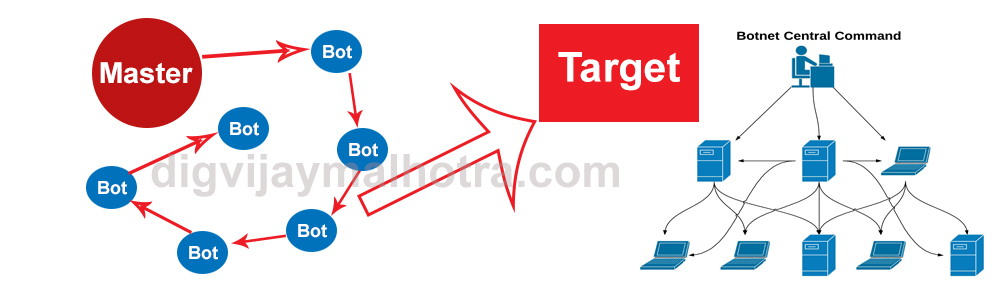 |
| Botnet also Known as zombie army |
What is Botnet??
The word Botnet is formed from the words ‘robot’ and ‘network’. Cybercriminals use special Trojan viruses to breach the security of several users’ computers, take control of each computer, and organize all of the infected machines into a network of ‘bots’ that the criminal can remotely manage.A botnet is a number of Internet-connected computers communicating with other similar machines in an effort to complete repetitive tasks and objectives. This can be as mundane as keeping control of an Internet Relay Chat (IRC) channel, or it could be used to send spam email or participate in distributed denial-of-service attacks. The word botnet is a combination of the words robot and network. The term is usually used with a negative or malicious connotation.
|
Types of botnets
|
Any such computer is referred to as a zombie - in effect, a computer "robot" or "bot" that serves the wishes of some master spam or virus originator. Most computers compromised in this way are home-based. According to a report from Russian-based Kaspersky Labs, botnets -- not spam, viruses, or worms -- currently pose the biggest threat to the Internet. A report from Symantec came to a similar conclusion.
|
How To Build A Botnet
Opening his browser, Mullis searched for a botnet builder tool for malware known as Ice IX. Google's top response to his particular query—which I'm not going to reveal here—yielded a site that offered the tool for free. Ice IX is a nasty little piece of malware that injects a fake Facebook page into a victim's browser that collects credit card information under false pretenses.
Any malware, though, would have done just as well. Using methods and tools that can be found online in minutes, a botnet creator can create a central command and control server and then use social engineering to inject malware onto the victim's computer—by, say, emailing an innocuous looking but disguised file, or tricking a user into downloading the file from a compromised website.
After downloading and installing the Ice IX kit software, Mullis started up its bot builder kit and began to set up the parameters for the malware—specifying, for instance, how often the malware would communicate with the command server, what actions it would undertake and even how it would hide from anti-virus scans. Much of this work was simply a matter of filling in appropriate fields in the Ice IX builder kit's straightforward Windows interface.
Some of the rest required editing the Ice IX kit's powerful setup.txt script. Individual command lines in that script might direct the malware to take screenshots of pages that were visited by the zombie machine's browser on a certain domain, such as a bank web site. Or have the malware tell the zombie machine's browser to block sites (such as anti-virus updating sites) altogether. It can also redirect legitimate site URLs to malevolent sites intended to collect critical information—credit card numbers, Social Security numbers, passwords. You name it.
Once he'd set the malware's specifications, including the location of its controlling command server, Mullis uploaded Ice IX-produced files to his LAMP server. And presto—he had a fully configured botnet command server.
|